Sending Transaction Data to DQC (Decipher / Forsta)
This guide walks you through sending survey transaction data from your Decipher/Forsta survey to the DQC Transaction API. After the DQC Quality Tool has scored each participant during fielding (see General Setup), this integration posts each participant's outcome — disposition, timestamps, identifiers, and the quality‑tool results — to DQC at the appropriate points in the survey lifecycle.
📌 Overview
The integration makes a server‑side call (v2SendRequest) from inside the survey XML at three
moments, so no participant is lost. Followed through from the participant's side, the record DQC
holds moves like this:
The first send happens after question 1 and the final one at the end of the interview,
whichever way it ends. Because the endpoint upserts on requestId, the Partial record is not a
separate row — it is the same record, later overwritten by the final disposition.
The one branch that never gets a second send is abandonment: the participant answers question 1
and leaves, so <exec when="finished"> never fires and the record keeps the status of Partial it
already had. That is not a lost response — DQC maps a Partial status to the Abandon disposition
(see Dispositions), which is exactly why the in-progress send exists.
The four values above are the status field. Everything DQC derives from it — dispositions included
— is downstream of these:
| Event | When it fires | Status sent |
|---|---|---|
| In‑progress | After the participant answers the first question | Partial |
| Survey Completed | When the participant finishes the survey | Qualified |
| Termination / Over‑quota | When the participant is terminated (by a DQC termination or your own) or hits a full quota | Terminated / Overquota |
The send runs on Decipher's server. Your key is still visible, because the same key is in the
toolbox import URL that the participant's browser loads. Decipher uses a
general key for this reason. The DQC endpoint upserts on the
participant's requestId, so the in‑progress send is
later overwritten by the final disposition — and if a participant abandons the survey after the first
question, DQC still has their record.
How status is derived
status comes from the Decipher markers on the response (mk = [x for x in p.markers]):
overquota → Overquota, qualified → Qualified, terminated or any term:‑prefixed marker
→ Terminated, and anything else → Partial. Since Decipher marks every <term> with a
term:<label> marker, your own terminations are
reported as Terminated as well.
The full marker list is sent as the markers field, so you can see which marker ended the
interview — DQC's own (dqc_duplicate_termination, …) or one of yours. terminationReason stays
DQC‑only: it comes from the four dqc_*_termination markers and is "" for a custom termination.
What DQC then does with status is covered in Dispositions.
Which survey the response came from
Every send also identifies the Decipher survey itself. Both values are read straight from Decipher at send time — there is nothing to configure:
| Field | Source | Example |
|---|---|---|
decipherSurveyIdentifier | gv.survey.path | selfserve/54a/260708 |
decipherSurveyState | gv.survey.root.state | live |
decipherSurveyIdentifier is the survey's path — your client directory (54a) plus the project
number (260708). It doesn't change when the survey goes live, and it's the same path that appears in
the survey's report URL:
https://se1.decipherinc.com/apps/respondents/report/selfserve/54a/260708
decipherSurveyState is the survey's lifecycle state (dev, testing, live or closed), so you can
tell real fielding data apart from test traffic.
⚠️ Step 0 — Request domain authorization from Forsta (required first)
Decipher only allows server‑side API calls (v2SendRequest) to pre‑approved domains. Until the
DQC domain is authorized for your account, every call is rejected with an error like "API call to
api.dqco-op.com is not allowed. Ask support to add this hostname to the file api.txt in your client
directory."
The DQC hostname must be added to both the api.txt file and the hooks.py file, and
allowed for v2SendRequest (the request_allowed hook), in your client directory. This is a
one‑time configuration performed by Forsta Support — submit a request to
SurveySupport@forsta.com from an email on your account's domain. By default Forsta scopes the
change to the client directory you name in the request, not your whole account — see the scope
note at the end of this section if you manage more than one.
Finding your account and client directory
Your account is the subdomain in your Decipher URLs, and your client directory is the path segment(s) between the fixed part of the URL and the survey number. The easiest way to get both right is to read them off the Overview page URL — it works for any survey, new or already fielding, unlike pages that only exist once a survey has responses:
https://se1.decipherinc.com/apps/portal/#/projects/detail/selfserve/54a/260303
- Account:
se1(the part before.decipherinc.com) - Client directory:
selfserve/54a(everything between the fixed URL prefix and the survey number —260303here is just this survey's ID, not part of the directory)
If your account is on Decipher's shared self‑managed server tier (common on lower service tiers),
the account subdomain and the first segment of the client directory can both literally be selfserve
— for example https://selfserve.decipherinc.com/survey/selfserve/20f6/260200 → account selfserve,
client directory selfserve/20f6. Don't assume selfserve in the path is your account: always read
the account from the subdomain, and the full client directory from the path segment(s) before the
survey number, even when both start with the same word.
Sample request email
Subject: Authorizing domains for API integrations — add DQC hostname to api.txt and hooks.py
Hello,
This request falls under your Scope of Support item: "Authorizing domains for survey access, email domains or API integrations."
We're integrating our Decipher surveys with the Data Quality Co‑op (DQC) Transaction API and use the
v2SendRequestfunction, for example in this survey: <link to one of your surveys> (e.g.https://se1.decipherinc.com/apps/portal/#/projects/detail/selfserve/54a/260303).When testing, outbound calls fail with:
"API call to api.dqco-op.com is not allowed. Ask support to add this hostname to the file api.txt in your client directory."
Please add the following hostname to both
api.txtandhooks.py, and allow it forrequest_allowedandv2SendRequest, in our client directory:
api.dqco-op.comThis integration is already built and tested, and in production use with other companies on the same setup — this is a support/config change on your end, not a new integration to review.
Account: <your Decipher instance, e.g. se1.decipherinc.com> · Client directory: <your client dir, e.g. selfserve/54a>
Please confirm once this is in place.
Thank you.
hooks.py explicitly — api.txt alone isn't enough for v2SendRequestSupport sometimes only adds the hostname to api.txt and stops there. That's enough for the generic
API Integration logic node, but v2SendRequest additionally needs the request_allowed hook added
in hooks.py.
Forsta applies this at the client‑directory level, so other directories on your account — including ones your team manages for other companies or projects — won't automatically inherit it. If you expect to onboard more surveys or client directories, ask Forsta directly whether they can allow the hostname more broadly (e.g. account‑wide) instead of repeating this per directory; otherwise, plan to send this same request again for each new client directory. You can verify the authorization is active by running the survey and confirming the call is no longer blocked (see Viewing what was sent).
Prerequisites
Before adding the transaction code, make sure:
- ✅ The DQC Quality Tool is installed — the toolbox script, the
save_dqc_data()function, and thedqc_dataholder question, all from General Setup. - ✅ Your survey is a secure survey (
secure="1"on the<survey>tag). - ✅ Forsta has authorized the DQC domain (Step 0 above).
Step 1 — Add the sending function
Add the send_results_dqc() function to the same <exec when="init"> block from General Setup,
directly underneath your existing save_dqc_data() function — both live inside that one
<exec when="init"> block. The block below is that complete block, with
save_dqc_data() and send_results_dqc() together, so you can copy it whole and paste it over the
<exec when="init"> from General Setup — no manual merging.
<exec when="init">
# ===========================================================================
# YOU CAN EDIT THIS SECTION - your settings
# https://docs.dataqualityco-op.com/docs/quality-tools/integrations/decipher/transaction-data-setup/general-setup
# ===========================================================================
GENERAL_DQC_API_KEY = "GENERAL_DQC_API_KEY"   # your general key, the same one as in the toolbox import URL above


# ===========================================================================
# DQC INTERNALS - GENERAL FUNCTIONS
# ===========================================================================
defaultAnswer = 'Submission too quick, data not processed'
def save_dqc_data():
    defaultDeviceFailuresAnswer = 'None' if getattr(p, 'client_dqc_participant_id', '') else defaultAnswer
    dqc_data.rid.val = getattr(p, 'client_dqc_request_id', '') or defaultAnswer
    dqc_data.pid.val = getattr(p, 'client_dqc_participant_id', '') or defaultAnswer
    dqc_data.per.val = getattr(p, 'client_dqc_persona', '') or 'NONE'
    dqc_data.dts.val = getattr(p, 'client_dqc_data_trust_score', '') or '0'
    dqc_data.dcs.val = getattr(p, 'client_dqc_device_score', '') or '0'
    dqc_data.cty.val = getattr(p, 'client_dqc_country_code', '') or defaultAnswer
    dqc_data.sub.val = getattr(p, 'client_dqc_subdivision_name', '') or defaultAnswer
    dqc_data.dup.val = getattr(p, 'client_dqc_is_duplicate', False)
    dqc_data.sid.val = getattr(p, 'client_dqc_survey_id', '') or defaultAnswer
    dqc_data.dfc.val = getattr(p, 'client_dqc_device_failures', '') or defaultDeviceFailuresAnswer

def send_results_dqc():
    import datetime

    # Decipher returns extra variables HTML-encoded. chr() avoids literals that
    # would break this exec block's XML; "amp;" is last to avoid double-decoding.
    def dqcDecode(s):
        try:
            amp = chr(38)
            s = str(s)
            s = s.replace(amp + "#47;", "/")
            s = s.replace(amp + "lt;", chr(60))
            s = s.replace(amp + "gt;", chr(62))
            s = s.replace(amp + "quot;", chr(34))
            s = s.replace(amp + "#39;", chr(39))
            s = s.replace(amp + "apos;", chr(39))
            s = s.replace(amp + "amp;", amp)
            return s
        except: return s

    # Convert Decipher's MM/DD/YYYY HH:MM to ISO 8601.
    def dqcToIso(v):
        s = dqcDecode(v).strip()
        try:    return datetime.datetime.strptime(s, "%m/%d/%Y %H:%M").isoformat()
        except: return s

    # Coerce a value to a JSON-safe form without raising.
    def dqcSafe(v):
        try:
            if isinstance(v, (bool, int, float)): return v
            try:    return ('%s' % (v,))
            except: return v.encode('utf-8', 'ignore') if hasattr(v, 'encode') else ''
        except: return ''

    # The lambda defers the read, so a bad field is skipped here rather than
    # breaking the rest of the payload.
    def addDQCField(key, getter):
        try:    dqcPayload[key] = dqcSafe(getter())
        except: pass

    # The participant's sample source title. vlist rows carry both halves, so we
    # match r.label against the list value and read the title off that row.
    # Missing titles are caught for every source at entry by dqcValidateSampleSources().
    def dqcVListSellerName():
        key = str(list).strip()
        title = ""
        try:
            for r in vlist.rows:
                if str(r.label) != key:
                    continue
                title = dqcSourceTitle(r)
                break
        except Exception:
            title = ""
        return "" if dqcTitleMissing(title) else title

    # --- Disposition from Decipher markers ---
    mk = []
    try:    mk = [x for x in p.markers]   # NOT list(p.markers): 'list' is a Decipher variable that shadows the builtin
    except: mk = []
    # A custom termination may set only its own marker, so "term:"-prefixed
    # markers count as terminations too.
    if   "overquota" in mk:   dqcStatus = "Overquota"
    elif "qualified" in mk:   dqcStatus = "Qualified"
    elif "terminated" in mk or any(str(x).startswith("term:") for x in mk):  dqcStatus = "Terminated"
    else:                     dqcStatus = "Partial"

    # --- Termination reason (why a DQC termination ended the survey; "" when none) ---
    DQC_TERMINATION_REASONS = {
        "dqc_device_score_termination":     "deviceScore",
        "dqc_data_trust_score_termination": "dataTrustScore",
        "dqc_persona_termination":          "persona",
        "dqc_duplicate_termination":        "duplicate",
    }
    dqcTerminationReason = ""
    for m in mk:
        key = str(m).strip()
        if key in DQC_TERMINATION_REASONS:
            dqcTerminationReason = DQC_TERMINATION_REASONS[key]
            break

    # --- Timestamps in UTC ---
    # start_date is in the SERVER's timezone; measure the offset at runtime and
    # shift it, then derive end_date from qtime.
    dqcStart = ""
    dqcEnd = ""
    try:
        sdtLocal  = datetime.datetime.strptime(dqcToIso(start_date.val), "%Y-%m-%dT%H:%M:%S")
        dqcOffset = datetime.datetime.now() - datetime.datetime.utcnow()
        sdtUtc    = (sdtLocal - dqcOffset).replace(microsecond=0)   # whole seconds to ...SSZ
        dqcStart  = sdtUtc.isoformat() + "Z"
        try:
            dqcDur = getattr(qtime, "val", qtime)   # qtime = total interview time (seconds)
            dqcEnd = (sdtUtc + datetime.timedelta(seconds=float(dqcDur))).replace(microsecond=0).isoformat() + "Z"
        except: pass
    except: pass

    # --- Build the payload ---
    dqcPayload = {}
    addDQCField("status",           lambda: dqcStatus)
    addDQCField("uuid",             lambda: uuid)
    addDQCField("startDate",        lambda: dqcStart)
    addDQCField("endDate",          lambda: dqcEnd)
    addDQCField("terminationReason", lambda: dqcTerminationReason)
    addDQCField("source",           lambda: list)
    addDQCField("vlistSellerName",  lambda: dqcVListSellerName())
    addDQCField("surveyId",         lambda: dqcDecode(dqc_data.sid.val))
    addDQCField("decipherSurveyIdentifier", lambda: gv.survey.path)         # e.g. "selfserve/54a/260708"
    addDQCField("decipherSurveyState",      lambda: gv.survey.root.state)   # dev / testing / live / closed
    addDQCField("requestId",       lambda: dqc_data.rid.val)
    addDQCField("participantId",   lambda: dqc_data.pid.val)
    addDQCField("deviceScore",     lambda: dqc_data.dcs.val)
    addDQCField("dataTrustScore", lambda: dqc_data.dts.val)
    addDQCField("persona",          lambda: dqc_data.per.val)
    addDQCField("isDuplicate",      lambda: dqc_data.dup.val)
    addDQCField("country",          lambda: dqcDecode(dqc_data.cty.val))
    addDQCField("subdivision",      lambda: dqcDecode(dqc_data.sub.val))
    addDQCField("deviceFailures",   lambda: dqc_data.dfc.val)
    addDQCField("markers",          lambda: mk)   # every marker on the response, incl. custom terminations

    # ===========================================================================
    # YOU CAN EDIT THIS SECTION - SELLER (SUPPLIER) / BUYER
    # https://docs.dataqualityco-op.com/docs/quality-tools/integrations/decipher/transaction-data-setup/company-mapping
    # ===========================================================================
    # The buyer hosts the survey; the seller is the supplier the respondent came
    # from. A seller is required - edit the addDQCField lines below.

    # ===========================================================================
    # FAILURES MAPPING - not configured, see the guide to add checks
    # https://docs.dataqualityco-op.com/docs/quality-tools/integrations/decipher/transaction-data-setup/failures
    # ===========================================================================

    # ===========================================================================
    # DQC INTERNALS - SEND
    # ===========================================================================
    # failures is attached last so anything added in the section above is
    # included. The key was already checked at entry by dqcValidateApiKey().
    try:
        v2SendRequest(url="https://api.dqco-op.com/data/decipher",
            method="post", type="json",
            headers={"Authorization": "apikey " + GENERAL_DQC_API_KEY,
                     "Content-Type": "application/json"},
            args=dqcPayload)
        try: dqc_debug.dump.val = "SENT(%s): %s" % (dqcStatus, repr(dqcPayload))
        except: pass
    except Exception as e:
        try: dqc_debug.dump.val = "ERROR: " + str(e)
        except: pass

# ===========================================================================
# DQC INTERNALS - SETTINGS VALIDATION, RUNS AT SURVEY ENTRY
# ===========================================================================
# A placeholder or empty key would 401 every send. Checked at entry so the
# survey stops until it is set, instead of losing every response silently.
def dqcValidateApiKey():
    if not GENERAL_DQC_API_KEY or GENERAL_DQC_API_KEY == "GENERAL_DQC_API_KEY":
        try: dqc_debug.dump.val = "ERROR: GENERAL_DQC_API_KEY placeholder not replaced - set your key in the init block"
        except: pass
        raise ValueError("GENERAL_DQC_API_KEY placeholder not replaced - set your key in the init block")

# A vlist row's text is "Title (list=N)"; drop the suffix to get the title.
def dqcSourceTitle(row):
    text = (getattr(row, 'text', '') or "").strip()
    return re.sub(r"\s*\(list=[^)]*\)\s*$", "", text) or text

# An untitled source cannot identify a supplier. Decipher renders those as
# "(no title)" or "Vlist N", so both count as missing.
def dqcTitleMissing(title):
    t = (title or "").strip()
    return (not t
            or t.lower() == "(no title)"
            or bool(re.match(r"^Vlist\s*\d+$", t))
            or bool(re.match(r"^\(list=[^)]*\)$", t)))

# Checks EVERY source, not just this participant's, so a missed title shows up on
# the first test link rather than whenever someone enters through that source.
def dqcValidateSampleSources():
    dqcUntitled = []
    try:
        for r in vlist.rows:
            if dqcTitleMissing(dqcSourceTitle(r)):
                dqcUntitled.append(str(r.label))
    except Exception:
        return   # vlist not readable here - skip rather than block entry (vlistSellerName is then sent empty)
    if dqcUntitled:
        dqcNoTitles = "sample sources with no title: list=%s - set a title on each samplesource" % (", ".join(dqcUntitled),)
        try: dqc_debug.dump.val = "ERROR: " + dqcNoTitles
        except: pass
        raise ValueError(dqcNoTitles)
</exec>
save_dqc_data()?If you added any fields to save_dqc_data(), keep your version and just
paste the send_results_dqc() function underneath it, inside the same <exec when="init"> block.
Also copy the GENERAL_DQC_API_KEY = "…" line to the top of that block: send_results_dqc() reads it.
Replace GENERAL_DQC_API_KEY (the variable at the top of the block) with your general key, the same key you
used in the toolbox import URL.
Check your setup at survey entry (required)
That block also defines dqcValidateApiKey() and dqcValidateSampleSources(). Add this directly
below your <exec when="init"> so both run for every participant:
<exec when="started">
dqcValidateApiKey()
dqcValidateSampleSources()
</exec>
started fires as soon as a participant loads the survey, before the first question — so a broken
setup stops your first test link instead of surfacing once the survey is already collecting.
dqcValidateApiKey() stops the survey while GENERAL_DQC_API_KEY is still the placeholder (or empty),
which would otherwise return 401 on every send.
dqcValidateSampleSources() reads every <samplesource> in your survey and stops the survey if
any of them has no title — the title is what DQC receives as
vlistSellerName, so an untitled source means an unidentifiable
supplier. It stops every participant, not just the ones arriving through the untitled source, so
you find out immediately instead of losing one supplier's responses quietly.
Both write the reason to the dqc_debug holder as well as stopping the
survey. Without this block nothing validates either one, and the problem only shows up in DQC's data
afterwards.
What a missing title looks like
This survey fails, because list="4" has an empty <title>:
<samplesources default="0">
  <samplesource list="0"><title>Cint</title> ... </samplesource>
  <samplesource list="4"><title></title> ... </samplesource>
</samplesources>
Anyone opening the survey — from any source, not only list=4 — gets Decipher's fatal error page
instead of the first question, naming the source you need to fix:
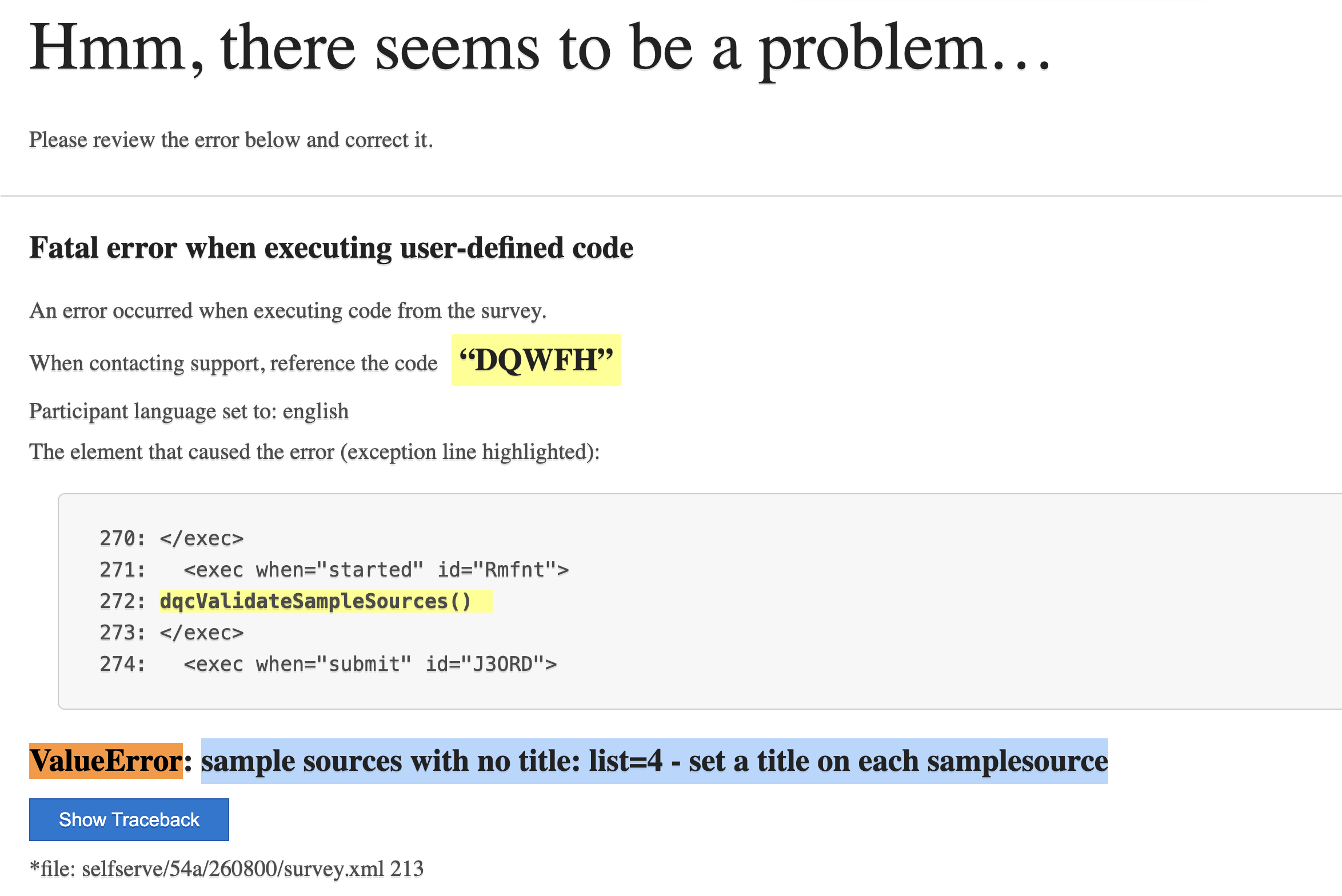
Figure: a participant's view when a sample source has no title. Add the title to that <samplesource> and the survey runs normally.
The vlistSellerName field
send_results_dqc() sends one field you never configure: vlistSellerName, the title of the
sample source the participant came through, read from your survey at send time.
<samplesource list="1"><title>PureSpectrum</title> ... </samplesource>
→ sends vlistSellerName: "PureSpectrum"
It's sent on every response, with nothing to add — which is why titling your sample
sources is the simplest way to identify the seller. If you also send an explicit sellerName or
supplierIndex from Company Mapping (Step 3), that value takes precedence.
Every participant resolves to one of your sources, so every source needs a title. If the entry URL has
no list value — or one your survey doesn't define — Decipher falls back to the default source
(<samplesources default="N">, usually 0), and with no default declared, to the first
<samplesource> in the block. That's why the default/first source needs a real supplier title just as
much as the rest: participants land there without ever passing a list value.
Title every <samplesource> — including the default, usually list="0" — with the supplier's
name. The check above stops the survey for everyone if any
source has an empty <title></title> or none at all, so run each of your source links once before
going live.
Customizing the payload
The payload is assembled one field at a time inside send_results_dqc() with
addDQCField(name, getter):
addDQCField("deviceScore", lambda: dqc_data.dcs.val)
#            ^ key sent to DQC      ^ how to read the value
- The first argument is the field name exactly as it will be sent to DQC.
- The second argument is a zero‑argument
lambdathat returns the value. Each read is wrapped in its owntry/except, so a missing or malformed value is simply skipped — it never breaks the rest of the payload.
addDQCField can only send a value that already exists — for a DQC Quality Tool field, one that
save_dqc_data() has already stored in the dqc_data holder. Adding an addDQCField(...) line on
its own will send an empty value.
So you can augment the payload with your own values using the same pattern — a Decipher survey or
meta variable available inside <exec> (e.g. uuid, start_date.val, p.markers, or sample/source
variables via gv.request.variables.get("<name>", "")), or anything else you capture. The value is
already available at send time, so one line is all it takes:
addDQCField("language", lambda: gv.request.variables.get("decLang", ""))
Need to send additional DQC Quality Tool fields beyond the defaults below? Contact DQC support and we'll help you set it up.
status, terminationReason, uuid, startDate, endDate, source,
vlistSellerName, surveyId, requestId, participantId,
deviceScore, dataTrustScore, persona, isDuplicate, country, subdivision,
deviceFailures, and markers (every Decipher marker on the response — see
How status is derived).
Step 2 — Call the function at the lifecycle points
save_dqc_data() is already called in <exec when="submit"> per General Setup. Add two calls to
send_results_dqc():
| Call | Placement | Purpose |
|---|---|---|
send_results_dqc() | a plain <exec> after the first question (before the second) | In‑progress send. Runs once the first answer is in, so drop‑offs are still captured (status="Partial"). |
send_results_dqc() | <exec when="finished">, next to your dqc_debug holder | Final send. The finished hook fires on completion and on termination/over‑quota, sending the final disposition. |
<!-- final send: completion, termination, or over-quota. The finished hook is not
     positional, so keep it with your dqc_debug holder -->
<exec when="finished">
send_results_dqc()
</exec>

<!-- ...your first question... -->

<suspend/>

<!-- in-progress send: after the first question, before the second -->
<exec>
send_results_dqc()
</exec>
The finished hook is a lifecycle hook, not positional — it fires when the response is finalized
regardless of where it sits in the XML, including when a <term> ends the survey early. That's why it
sits with the dqc_debug holder in the setup block rather than at the end of the survey.
Step 3 — Identify the companies (required)
Every transaction DQC receives is a buyer → seller: the company hosting the survey and the supplier the respondent came through. DQC requires a seller on every response — a response with no seller is rejected — so this step is not optional.
You attach them as payload fields using the same addDQCField pattern from Step 1. Because the seller can be identified in three different ways, the full setup — the buyer (buyerName) and the seller (sellerName / supplierIndex) — lives in its own guide:
➡️ Company Mapping — add the buyer and seller (the seller is required).
Full XML Survey Example
Here is a complete example of the final XML, with the transaction‑data egress integrated on top of the
General Setup code: the send_results_dqc() function inside the init exec, the dqc_debug holder,
the in‑progress send after the first question, and the final <exec when="finished">.
GENERAL_DQC_API_KEY in two placesThe placeholder GENERAL_DQC_API_KEY appears twice in this example and both must be set to your key:
- The toolbox import URL near the top:
.../tools/toolbox/GENERAL_DQC_API_KEY(client‑side). - The
GENERAL_DQC_API_KEY = "…"variable at the top of<exec when="init">(server‑side), which thesend_results_dqc()Authorizationheader reads.
If you replace only the first, the transaction send would return 401 on every response. As a safeguard, dqcValidateApiKey() writes ERROR: GENERAL_DQC_API_KEY placeholder not replaced to the dqc_debug holder and stops the survey at entry while the key is still the placeholder, so the misconfiguration surfaces on your first test link instead of failing silently on every response, and keeps stopping the survey until a valid key is set. The key shown here is not valid: generate your own.
View Complete XML Example
<?xml version="1.0" encoding="UTF-8"?>
<survey
  alt="Quality Tools Integration - Testing"
  autosave="0"
  builder:wizardCompleted="1"
  builderCompatible="1"
  compat="155"
  delphi="1"
  extraVariables="source,record,decLang,list,userAgent"
  fir="on"
  html:showNumber="0"
  mobile="compat"
  mobileDevices="smartphone,tablet,desktop"
  name="Survey"
  secure="1"
  setup="term,decLang,quota,time"
  ss:disableBackButton="1"
  ss:enableNavigation="1"
  ss:hideProgressBar="0"
  state="testing">

<samplesources default="0">
  <samplesource list="0">
    <title>Data Quality Co-op</title>
    <invalid>You are missing information in the URL. Please verify the URL with the original invite.</invalid>
    <completed>It seems you have already completed this survey.</completed>
    <exit cond="terminated">Thank you for taking our survey.</exit>
    <exit cond="qualified">Thank you for taking our survey. Your efforts are greatly appreciated!</exit>
    <exit cond="overquota">Thank you for taking our survey.</exit>
  </samplesource>
</samplesources>

<style name="respview.client.meta"><![CDATA[
  <link rel="preconnect" href="https://api.dqco-op.com" crossorigin="anonymous">
  <link rel="preconnect" href="https://fpmetrics.dqco-op.com" crossorigin="anonymous">
]]></style>

<style name="global.page.head" wrap="ready"><![CDATA[
(async () => {
  try {
    const { DQCToolBox } = await import('https://api.dqco-op.com/tools/toolbox/GENERAL_DQC_API_KEY');
    await DQCToolBox.getIdentity();
  } catch (error) {
    console.error('Error in client code:', error);
  }
})();
]]></style>
<suspend/>

<exec when="init">
# ===========================================================================
# YOU CAN EDIT THIS SECTION - your settings
# https://docs.dataqualityco-op.com/docs/quality-tools/integrations/decipher/transaction-data-setup/general-setup
# ===========================================================================
GENERAL_DQC_API_KEY = "GENERAL_DQC_API_KEY"   # your general key, the same one as in the toolbox import URL above


# ===========================================================================
# DQC INTERNALS - GENERAL FUNCTIONS
# ===========================================================================
defaultAnswer = 'Submission too quick, data not processed'
def save_dqc_data():
    defaultDeviceFailuresAnswer = 'None' if getattr(p, 'client_dqc_participant_id', '') else defaultAnswer
    dqc_data.rid.val = getattr(p, 'client_dqc_request_id', '') or defaultAnswer
    dqc_data.pid.val = getattr(p, 'client_dqc_participant_id', '') or defaultAnswer
    dqc_data.per.val = getattr(p, 'client_dqc_persona', '') or 'NONE'
    dqc_data.dts.val = getattr(p, 'client_dqc_data_trust_score', '') or '0'
    dqc_data.dcs.val = getattr(p, 'client_dqc_device_score', '') or '0'
    dqc_data.cty.val = getattr(p, 'client_dqc_country_code', '') or defaultAnswer
    dqc_data.sub.val = getattr(p, 'client_dqc_subdivision_name', '') or defaultAnswer
    dqc_data.dup.val = getattr(p, 'client_dqc_is_duplicate', False)
    dqc_data.sid.val = getattr(p, 'client_dqc_survey_id', '') or defaultAnswer
    dqc_data.dfc.val = getattr(p, 'client_dqc_device_failures', '') or defaultDeviceFailuresAnswer

def send_results_dqc():
    import datetime

    # Decipher returns extra variables HTML-encoded. chr() avoids literals that
    # would break this exec block's XML; "amp;" is last to avoid double-decoding.
    def dqcDecode(s):
        try:
            amp = chr(38)
            s = str(s)
            s = s.replace(amp + "#47;", "/")
            s = s.replace(amp + "lt;", chr(60))
            s = s.replace(amp + "gt;", chr(62))
            s = s.replace(amp + "quot;", chr(34))
            s = s.replace(amp + "#39;", chr(39))
            s = s.replace(amp + "apos;", chr(39))
            s = s.replace(amp + "amp;", amp)
            return s
        except: return s

    # Convert Decipher's MM/DD/YYYY HH:MM to ISO 8601.
    def dqcToIso(v):
        s = dqcDecode(v).strip()
        try:    return datetime.datetime.strptime(s, "%m/%d/%Y %H:%M").isoformat()
        except: return s

    # Coerce a value to a JSON-safe form without raising.
    def dqcSafe(v):
        try:
            if isinstance(v, (bool, int, float)): return v
            try:    return ('%s' % (v,))
            except: return v.encode('utf-8', 'ignore') if hasattr(v, 'encode') else ''
        except: return ''

    # The lambda defers the read, so a bad field is skipped here rather than
    # breaking the rest of the payload.
    def addDQCField(key, getter):
        try:    dqcPayload[key] = dqcSafe(getter())
        except: pass

    # The participant's sample source title. vlist rows carry both halves, so we
    # match r.label against the list value and read the title off that row.
    # Missing titles are caught for every source at entry by dqcValidateSampleSources().
    def dqcVListSellerName():
        key = str(list).strip()
        title = ""
        try:
            for r in vlist.rows:
                if str(r.label) != key:
                    continue
                title = dqcSourceTitle(r)
                break
        except Exception:
            title = ""
        return "" if dqcTitleMissing(title) else title

    # --- Disposition from Decipher markers ---
    mk = []
    try:    mk = [x for x in p.markers]   # NOT list(p.markers): 'list' is a Decipher variable that shadows the builtin
    except: mk = []
    # A custom termination may set only its own marker, so "term:"-prefixed
    # markers count as terminations too.
    if   "overquota" in mk:   dqcStatus = "Overquota"
    elif "qualified" in mk:   dqcStatus = "Qualified"
    elif "terminated" in mk or any(str(x).startswith("term:") for x in mk):  dqcStatus = "Terminated"
    else:                     dqcStatus = "Partial"

    # --- Termination reason (why a DQC termination ended the survey; "" when none) ---
    DQC_TERMINATION_REASONS = {
        "dqc_device_score_termination":     "deviceScore",
        "dqc_data_trust_score_termination": "dataTrustScore",
        "dqc_persona_termination":          "persona",
        "dqc_duplicate_termination":        "duplicate",
    }
    dqcTerminationReason = ""
    for m in mk:
        key = str(m).strip()
        if key in DQC_TERMINATION_REASONS:
            dqcTerminationReason = DQC_TERMINATION_REASONS[key]
            break

    # --- Timestamps in UTC ---
    # start_date is in the SERVER's timezone; measure the offset at runtime and
    # shift it, then derive end_date from qtime.
    dqcStart = ""
    dqcEnd = ""
    try:
        sdtLocal  = datetime.datetime.strptime(dqcToIso(start_date.val), "%Y-%m-%dT%H:%M:%S")
        dqcOffset = datetime.datetime.now() - datetime.datetime.utcnow()
        sdtUtc    = (sdtLocal - dqcOffset).replace(microsecond=0)   # whole seconds to ...SSZ
        dqcStart  = sdtUtc.isoformat() + "Z"
        try:
            dqcDur = getattr(qtime, "val", qtime)   # qtime = total interview time (seconds)
            dqcEnd = (sdtUtc + datetime.timedelta(seconds=float(dqcDur))).replace(microsecond=0).isoformat() + "Z"
        except: pass
    except: pass

    # --- Build the payload ---
    dqcPayload = {}
    addDQCField("status",           lambda: dqcStatus)
    addDQCField("uuid",             lambda: uuid)
    addDQCField("startDate",        lambda: dqcStart)
    addDQCField("endDate",          lambda: dqcEnd)
    addDQCField("terminationReason", lambda: dqcTerminationReason)
    addDQCField("source",           lambda: list)
    addDQCField("vlistSellerName",  lambda: dqcVListSellerName())
    addDQCField("surveyId",         lambda: dqcDecode(dqc_data.sid.val))
    addDQCField("decipherSurveyIdentifier", lambda: gv.survey.path)         # e.g. "selfserve/54a/260708"
    addDQCField("decipherSurveyState",      lambda: gv.survey.root.state)   # dev / testing / live / closed
    addDQCField("requestId",       lambda: dqc_data.rid.val)
    addDQCField("participantId",   lambda: dqc_data.pid.val)
    addDQCField("deviceScore",     lambda: dqc_data.dcs.val)
    addDQCField("dataTrustScore", lambda: dqc_data.dts.val)
    addDQCField("persona",          lambda: dqc_data.per.val)
    addDQCField("isDuplicate",      lambda: dqc_data.dup.val)
    addDQCField("country",          lambda: dqcDecode(dqc_data.cty.val))
    addDQCField("subdivision",      lambda: dqcDecode(dqc_data.sub.val))
    addDQCField("deviceFailures",   lambda: dqc_data.dfc.val)
    addDQCField("markers",          lambda: mk)   # every marker on the response, incl. custom terminations

    # ===========================================================================
    # YOU CAN EDIT THIS SECTION - SELLER (SUPPLIER) / BUYER
    # https://docs.dataqualityco-op.com/docs/quality-tools/integrations/decipher/transaction-data-setup/company-mapping
    # ===========================================================================
    # The buyer hosts the survey; the seller is the supplier the respondent came
    # from. A seller is required - edit the addDQCField lines below.

    # ===========================================================================
    # FAILURES MAPPING - not configured, see the guide to add checks
    # https://docs.dataqualityco-op.com/docs/quality-tools/integrations/decipher/transaction-data-setup/failures
    # ===========================================================================

    # ===========================================================================
    # DQC INTERNALS - SEND
    # ===========================================================================
    # failures is attached last so anything added in the section above is
    # included. The key was already checked at entry by dqcValidateApiKey().
    try:
        v2SendRequest(url="https://api.dqco-op.com/data/decipher",
            method="post", type="json",
            headers={"Authorization": "apikey " + GENERAL_DQC_API_KEY,
                     "Content-Type": "application/json"},
            args=dqcPayload)
        try: dqc_debug.dump.val = "SENT(%s): %s" % (dqcStatus, repr(dqcPayload))
        except: pass
    except Exception as e:
        try: dqc_debug.dump.val = "ERROR: " + str(e)
        except: pass

# ===========================================================================
# DQC INTERNALS - SETTINGS VALIDATION, RUNS AT SURVEY ENTRY
# ===========================================================================
# A placeholder or empty key would 401 every send. Checked at entry so the
# survey stops until it is set, instead of losing every response silently.
def dqcValidateApiKey():
    if not GENERAL_DQC_API_KEY or GENERAL_DQC_API_KEY == "GENERAL_DQC_API_KEY":
        try: dqc_debug.dump.val = "ERROR: GENERAL_DQC_API_KEY placeholder not replaced - set your key in the init block"
        except: pass
        raise ValueError("GENERAL_DQC_API_KEY placeholder not replaced - set your key in the init block")

# A vlist row's text is "Title (list=N)"; drop the suffix to get the title.
def dqcSourceTitle(row):
    text = (getattr(row, 'text', '') or "").strip()
    return re.sub(r"\s*\(list=[^)]*\)\s*$", "", text) or text

# An untitled source cannot identify a supplier. Decipher renders those as
# "(no title)" or "Vlist N", so both count as missing.
def dqcTitleMissing(title):
    t = (title or "").strip()
    return (not t
            or t.lower() == "(no title)"
            or bool(re.match(r"^Vlist\s*\d+$", t))
            or bool(re.match(r"^\(list=[^)]*\)$", t)))

# Checks EVERY source, not just this participant's, so a missed title shows up on
# the first test link rather than whenever someone enters through that source.
def dqcValidateSampleSources():
    dqcUntitled = []
    try:
        for r in vlist.rows:
            if dqcTitleMissing(dqcSourceTitle(r)):
                dqcUntitled.append(str(r.label))
    except Exception:
        return   # vlist not readable here - skip rather than block entry (vlistSellerName is then sent empty)
    if dqcUntitled:
        dqcNoTitles = "sample sources with no title: list=%s - set a title on each samplesource" % (", ".join(dqcUntitled),)
        try: dqc_debug.dump.val = "ERROR: " + dqcNoTitles
        except: pass
        raise ValueError(dqcNoTitles)
</exec>

<exec when="started">
dqcValidateApiKey()
dqcValidateSampleSources()
</exec>

<exec when="submit">
  save_dqc_data()
</exec>

<text
  cond="0"
  label="dqc_data"
  optional="0"
  size="10"
  translateable="0"
  where="execute,survey,report">
  <title>DQC Data Holder</title>
  <row label="rid">dqc-request-id</row>
  <row label="pid">dqc-participant-id</row>
  <row label="dts">dqc-data-trust-score</row>
  <row label="per">dqc-persona</row>
  <row label="dcs">dqc-device-score</row>
  <row label="dup">dqc-is-duplicate</row>
  <row label="cty">dqc-country</row>
  <row label="sub">dqc-subdivision</row>
  <row label="sid">dqc-survey-id</row>
  <row label="dfc">dqc-device-failures</row>
</text>

<text label="dqc_debug" cond="0" size="1000" translateable="0" where="execute,survey,report">
  <title>DQC debug holder</title>
  <row label="dump">debug</row>
  <row label="fail">failed checks</row>
</text>

<exec when="finished">
send_results_dqc()
</exec>

<suspend/>

<radio
  label="Q1">
  <title>Q1: Are you human?</title>
  <comment>Select one</comment>
  <row label="r1">Yes</row>
  <row label="r2">No</row>
</radio>

<suspend/>

<exec>
send_results_dqc()
</exec>

<radio
  label="Q2">
  <title>Q2: Are you a duplicate?</title>
  <comment>Select one</comment>
  <row label="r1">Yes</row>
  <row label="r2">No</row>
</radio>

<suspend/>

<radio
  label="Q3">
  <title>Q3: You made it to the end of the example survey</title>
  <comment>Select one</comment>
  <row label="r1">Yay</row>
  <row label="r2">Bummer</row>
</radio>

<suspend/>


</survey>
Viewing what was sent
Add one hidden question so you can inspect what each send dispatched, directly in Responses →
View/Edit Responses. (The dqc_data holder is already part of General Setup and is not repeated
here.)
<text label="dqc_debug" cond="0" size="1000" translateable="0" where="execute,survey,report">
  <title>DQC debug holder</title>
  <row label="dump">debug</row>
  <row label="fail">failed checks</row>
</text>
Each send records its outcome in the dqc_debug holder. In Responses → View/Edit Responses, click
Choose Columns and add the dqc_debug: DQC debug holder survey variable, then Apply:
SENT(Qualified): {…}— the call was dispatched, with the exact payload.ERROR: …— a synchronous error (for example, the domain not yet authorized — see Step 0).
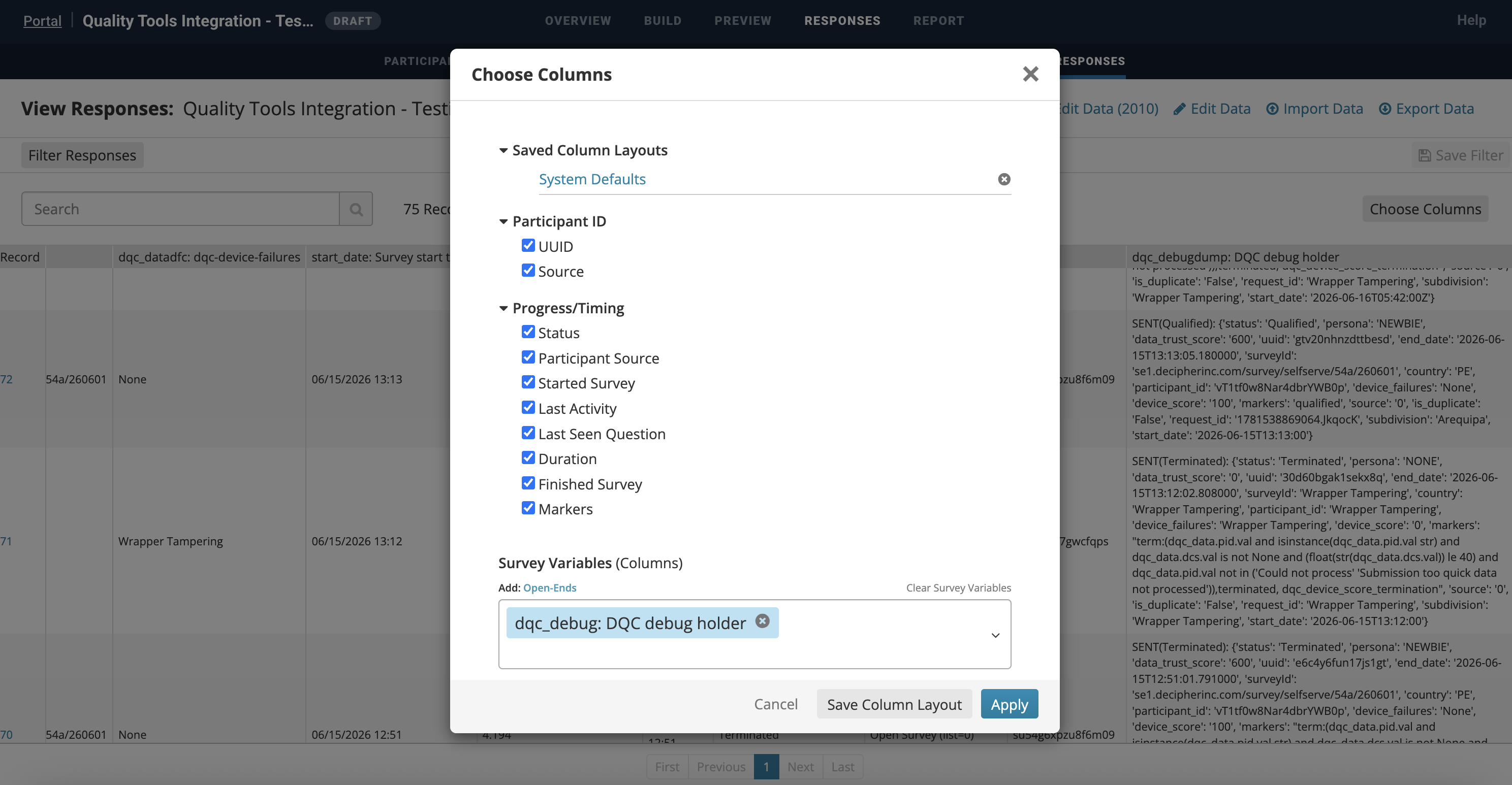
Figure: adding the dqc_debug column in Responses → View/Edit Responses. Each row shows the dispatched payload, e.g. SENT(Qualified) / SENT(Terminated).
v2SendRequest is asynchronous; final delivery is logged to survey.log in the survey directory.
📌 Notes & gotchas
- Timestamps are UTC. Decipher records
start_datein the server's local timezone; the code converts to UTC so it matches the endpoint. Do not send the raw local value. listis reserved. Decipher exposes a built‑inlistvariable (the sample source), which shadows Python'slist(). Read markers with[x for x in p.markers], neverlist(p.markers).- No literal
&,<, or>in<exec>code (including comments) — Decipher parses the block as XML and will reject them. Build an ampersand fromchr(38), or wrap the exec in<![CDATA[ … ]]>. - HTML‑encoded values.
start_date.valanddqc_data.sid.valcome back with/instead of/;dqcDecodefixes this. qtimeis read withgetattr(qtime, "val", qtime)so it works whetherqtimeis an object (.val) or a bare value.markersarrives as a stringified list —"['terminated', 'dqc_duplicate_termination']"— not as a JSON array, becausedqcSafecoerces every value to a string.- Don't break the survey. Field reads are isolated per‑field and the whole send is wrapped in
try/except, so a DQC outage or a malformed value never shows the participant an error. The two exceptions are setup mistakes, which throw on purpose: an unreplacedGENERAL_DQC_API_KEYand an untitled sample source.
Next steps
- Failures — send your custom in-survey quality checks (honeypots, traps, open-ends). Optional.
- Termination Scripts — automatically end low-quality respondents early. Optional.
- Troubleshooting —
401s, blocked hostnames, emptyvlistSellerNameand the rest, as symptom → cause → fix.
✅ Summary
- First, have Forsta authorize the DQC domain (
api.txt+request_allowed) — Step 0. - Add
send_results_dqc()belowsave_dqc_data()in yourinitexec. - Add the
<exec when="started">entry checks below yourinitblock — they validate yourGENERAL_DQC_API_KEYand require a title on every<samplesource>, including the default one. - Call
send_results_dqc()after the first question (in‑progress) and again in<exec when="finished">(final). - Add the
dqc_debugholder and confirm via its column that records send with the correctstatusand UTC timestamps.
For automatic early termination of low‑quality respondents, see Termination Scripts.